 Wild Rise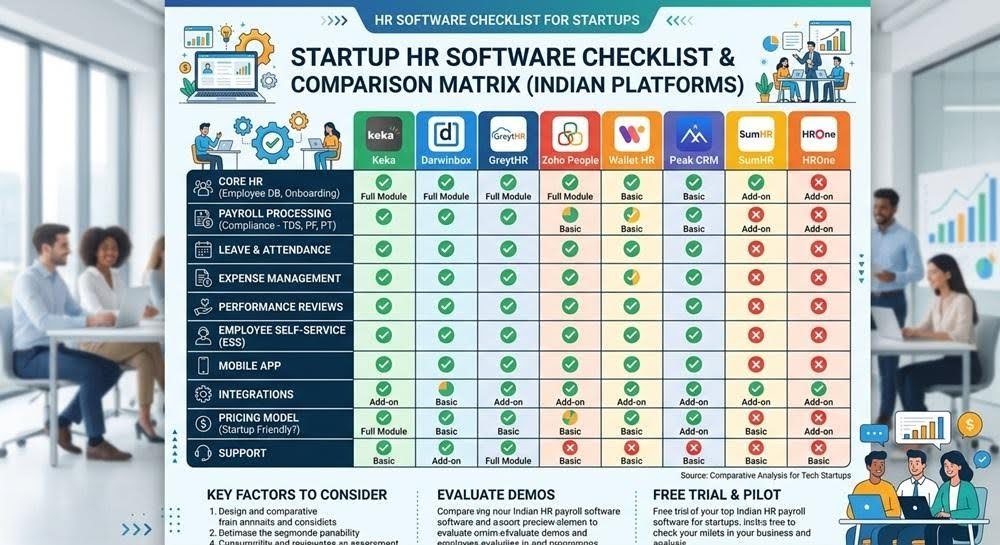
Most founders buy their first HR software the same way: someone on the team is drowning in spreadsheets, a Google search happens under time pressure, and a decision gets made based on whichever demo call went well that week. It usually works out fine for the first year, and then starts creaking exactly when the company can least afford the disruption of switching. Running a shortlist through a comparison matrix of Indian HR and payroll software before that first demo call tends to save the switch a year or two later.
Here’s a more deliberate way to think about it, built around the stages where Indian startups typically outgrow their first HR tool.
Stage 1: 1–15 Employees. You Need Compliance, Not a Platform
At this stage, the temptation is to buy a full HRMS suite with performance management, engagement surveys, and org charts. Resist it. What you actually need is:
- Statutory compliance handled correctly: PF, ESI, professional tax, and TDS calculated accurately from day one, because errors made now compound and get expensive to unwind later.
- A clean digital paper trail: offer letters, appointment letters, and payslips generated consistently, since early-stage documentation gaps become real problems during due diligence for your first funding round.
- Low setup overhead. You don’t have an HR person yet; whatever you choose needs to be usable by a founder or ops generalist without a steep learning curve.
Anything beyond this, such as leave management workflows or performance reviews, is premature at this headcount and mostly adds complexity you’ll pay for without using.
Stage 2: 15–50 Employees. You Need Structure Without Rigidity
This is where most first-tool switches happen, and it’s driven by one specific pain point: manual processes that worked for 10 people (approvals over WhatsApp, leave tracked in a shared sheet) start producing errors and disputes at 30.
What to evaluate for:
- Configurable leave and approval workflows that match how your company actually operates, not a rigid template built for a generic mid-size company.
- Multi-location and multi-state support, if you’re hiring beyond your home city. Professional tax slabs, minimum wage rules, and even public holidays vary by state, and software that assumes single-location operations will force manual workarounds.
- Reporting your investors will actually ask for, such as headcount by department, attrition rate, and cost-per-hire. You don’t need a full analytics suite, but you do need these numbers extractable without a manual spreadsheet exercise.
Stage 3: 50+ Employees. You Need Integration, Not Just Features
Past 50 employees, the risk shifts from “does the tool do X” to “does the tool talk to everything else.” A payroll tool that doesn’t integrate with your accounting software, or an HRMS that doesn’t sync with your access control and IT provisioning, creates duplicate manual work that scales badly.
Priority checklist at this stage:
- API or native integrations with your accounting/ERP system, not just CSV export.
- Role-based access control that lets you delegate HR operations without giving junior staff visibility into compensation data.
- Audit trails on every payroll and compliance change, increasingly important as you approach the size where formal audits (statutory or investor-driven) become routine.
- A genuine, checkable New Wage Code readiness position from the vendor, not a marketing claim, but a specific answer to how the tool handles the changing wage definition, since this is actively evolving and will affect your PF and gratuity liabilities regardless of company size.
The Mistake to Avoid at Every Stage
The single most expensive mistake founders make isn’t picking the “wrong” tool. Most reasonably reviewed HR software in India handles the basics competently. It’s picking a tool without checking what migration looks like when you eventually outgrow it. Ask directly: can we export our full historical data in a usable format, and has this vendor’s pricing model been stable, or does it jump sharply at specific headcount tiers designed to force an upgrade conversation?
Questions Worth Asking Every Vendor, Regardless of Stage
Beyond the stage-specific checklist above, a handful of questions apply no matter how big your team is. Ask each vendor how long their average customer stays before switching, and why the ones who leave actually leave; a vendor who can’t answer this honestly usually has something to hide. Ask what happens to your data if you cancel: is it exportable in a standard format, or does it sit locked behind an API you’d have to negotiate access to. And ask how pricing has changed for existing customers over the past two years, since a vendor that has repeatedly raised prices on locked-in customers is telling you something about how they’ll treat you once switching costs are high.
A tool that’s slightly less feature-rich but has clean, portable data is a better long-term bet than a feature-rich tool that locks you in.